Every jurisdiction you work in.
Side by side.
Architecture, engineering, and construction ("AEC") teams, and the permit teams beside them, juggle different setbacks, heights, floor area ratios ("FAR"), and fees in every municipality. ZoneSheet reads the zoning PDF you already have and lays each jurisdiction's numbers next to the others, every value cited to the source. No "is my city in your database?": there is no database, so any US jurisdiction whose ordinance is a text-layer PDF works on day one. The 2022 Census of Governments counts 38,736 counties, municipalities, and townships.
No credit card, no promotional email, and one click unsubscribes.
Paste two or three real codes you work in and ZoneSheet rebuilds the comparison on your data: setbacks, height, FAR, and fees side by side, each cited to the source. Try it now.

One project, three codes, and three different answers.
The same building type is governed by different numbers from one municipality to the next. ZoneSheet reads each jurisdiction's PDF and lines the answers up so the differences are obvious at a glance.
| Field | Riverton, CAR-1 Single-Family | Maple Grove, TXSF-2 Suburban | Hartwell, NCR-4 Urban |
|---|---|---|---|
| Front setback | 25 ft | 20 ft | 10 ft |
| Side setback | 5 ft | 7.5 ft | 5 ft |
| Max building height | 35 ft | 30 ft | 40 ft |
| Floor area ratio | 0.50 | 0.45 | 0.60 |
| Lot coverage | 40% | 45% | 55% |
| Parking minimum | 2 / unit | 2 / unit | 1 / unit |
| Variance fee | $475 | $625 | $700 |
Every jurisdiction you work in, read for you and cited line by line. Amendment Watch tells you the day a cited fee schedule changes.
The zoning intelligence workspace, and for a solo practitioner it costs less than one billable hour a month. Six capabilities, each with the screen that runs it.
Read the PDF you already have
Drop a text-layer zoning PDF from any US jurisdiction. A cited datasheet in about 30 seconds.
Live today for PDFs that carry a text layer, at /try.
Exceptions and overlays
Corner-lot footnotes, narrow-lot exceptions, and overlay districts flagged separately, never averaged into the standard numbers.
The engine catches many of these today.
Portfolio Mode
Rank two to 10 parcels by buildability, with the binding constraint named for each site.
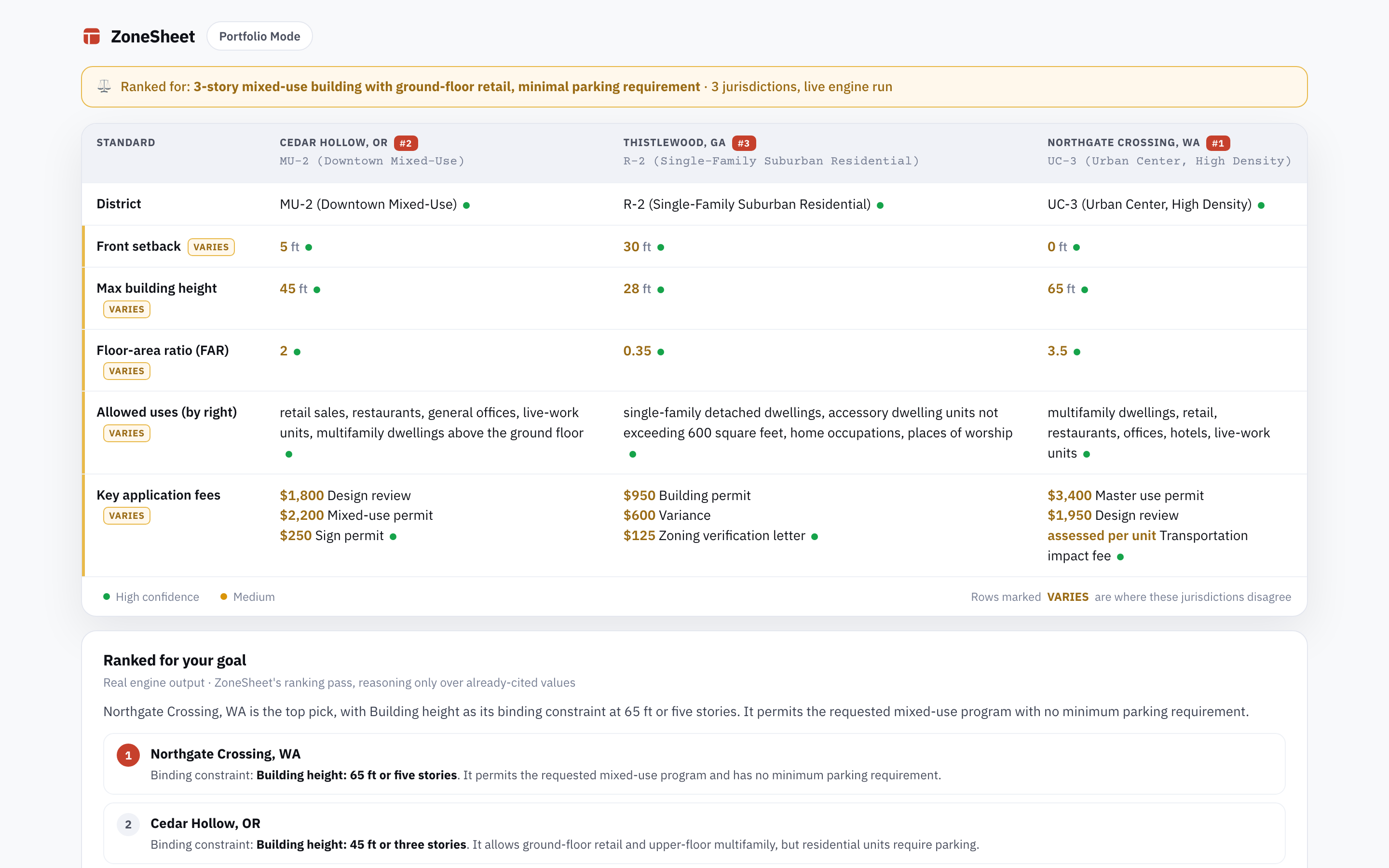
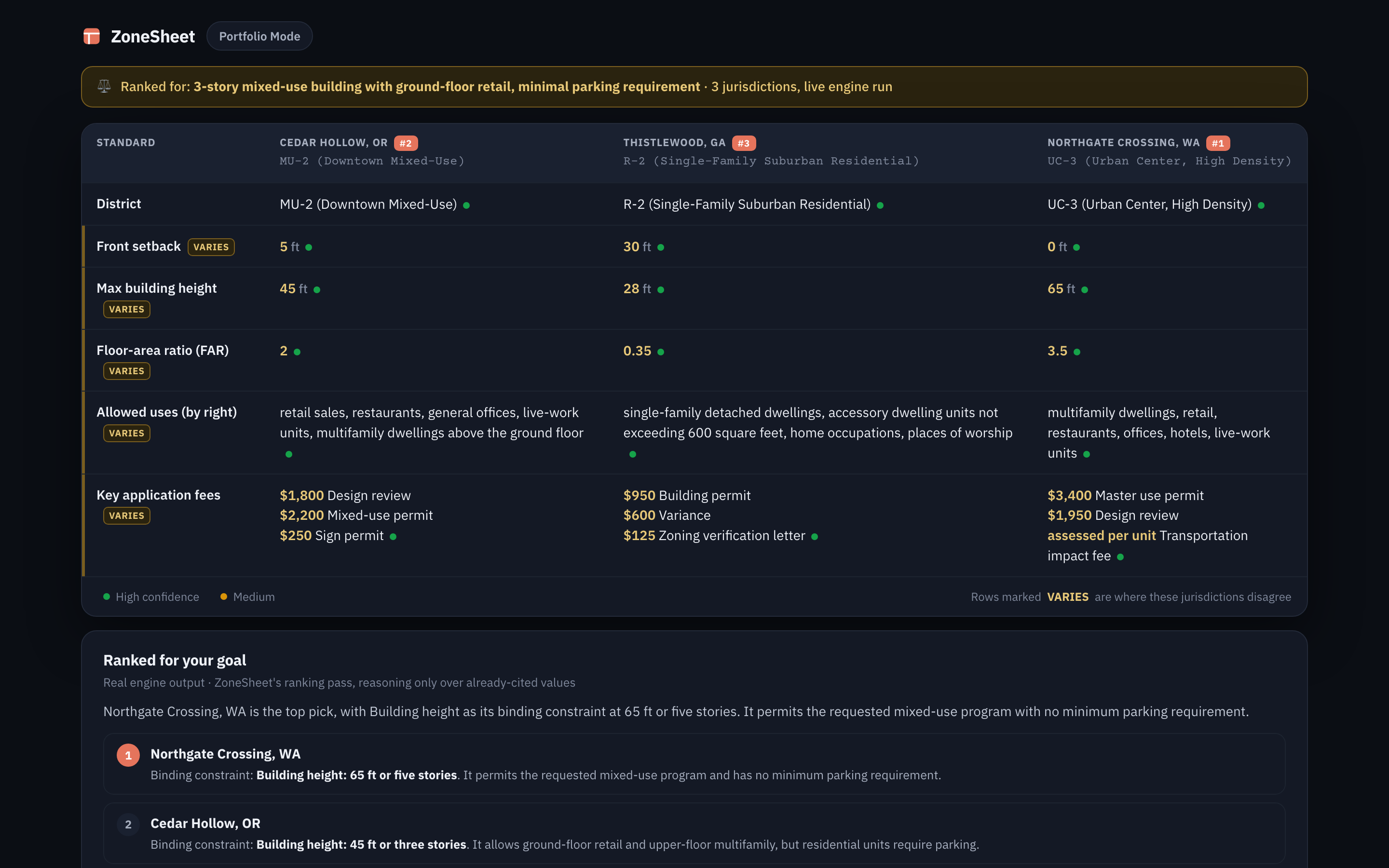
Live now. The screen above is a real /compare run, not a mockup.
Ask ZoneSheet
Chat over your sheet or your whole library: "which of my sites allows three-story multifamily by right?"
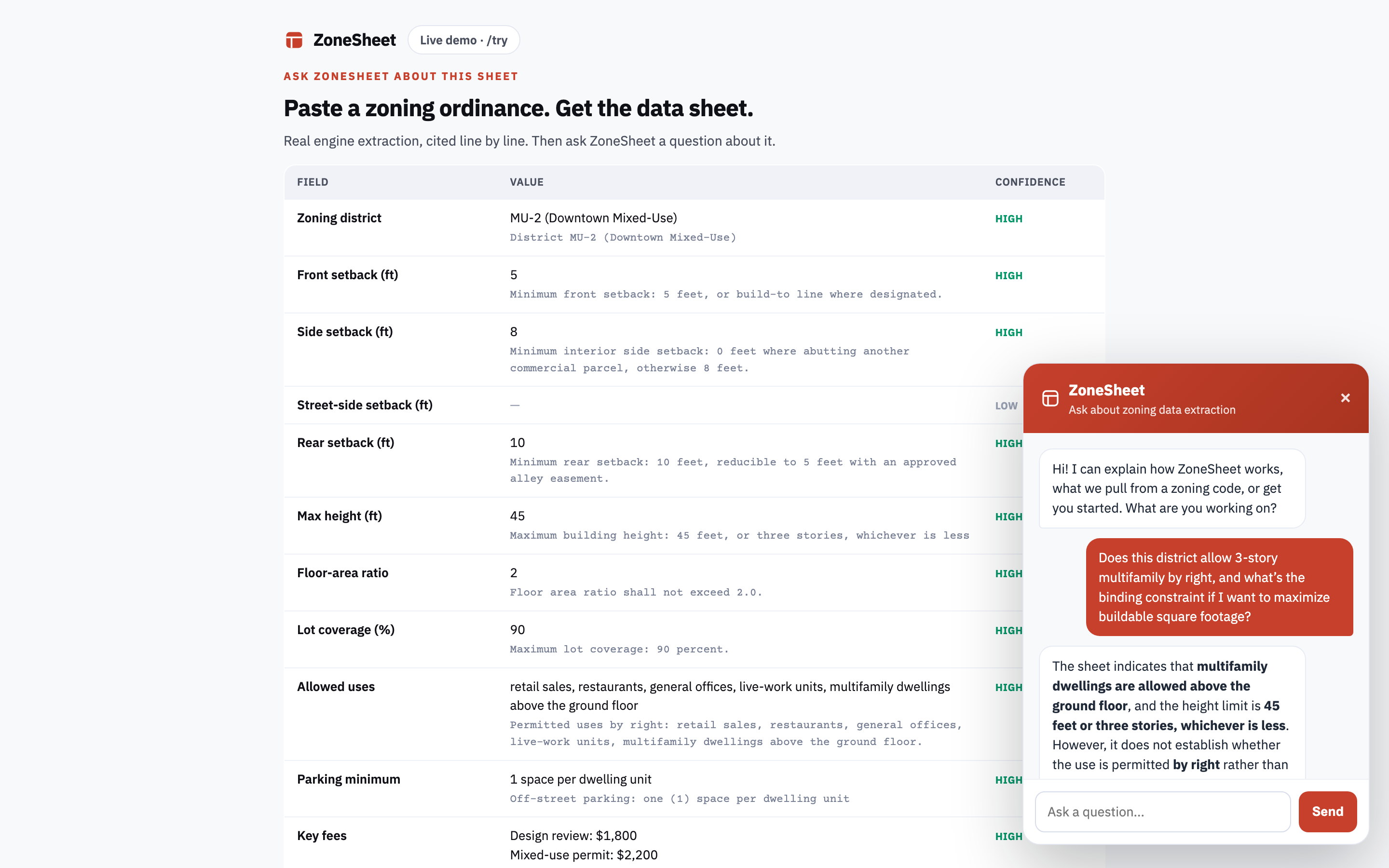
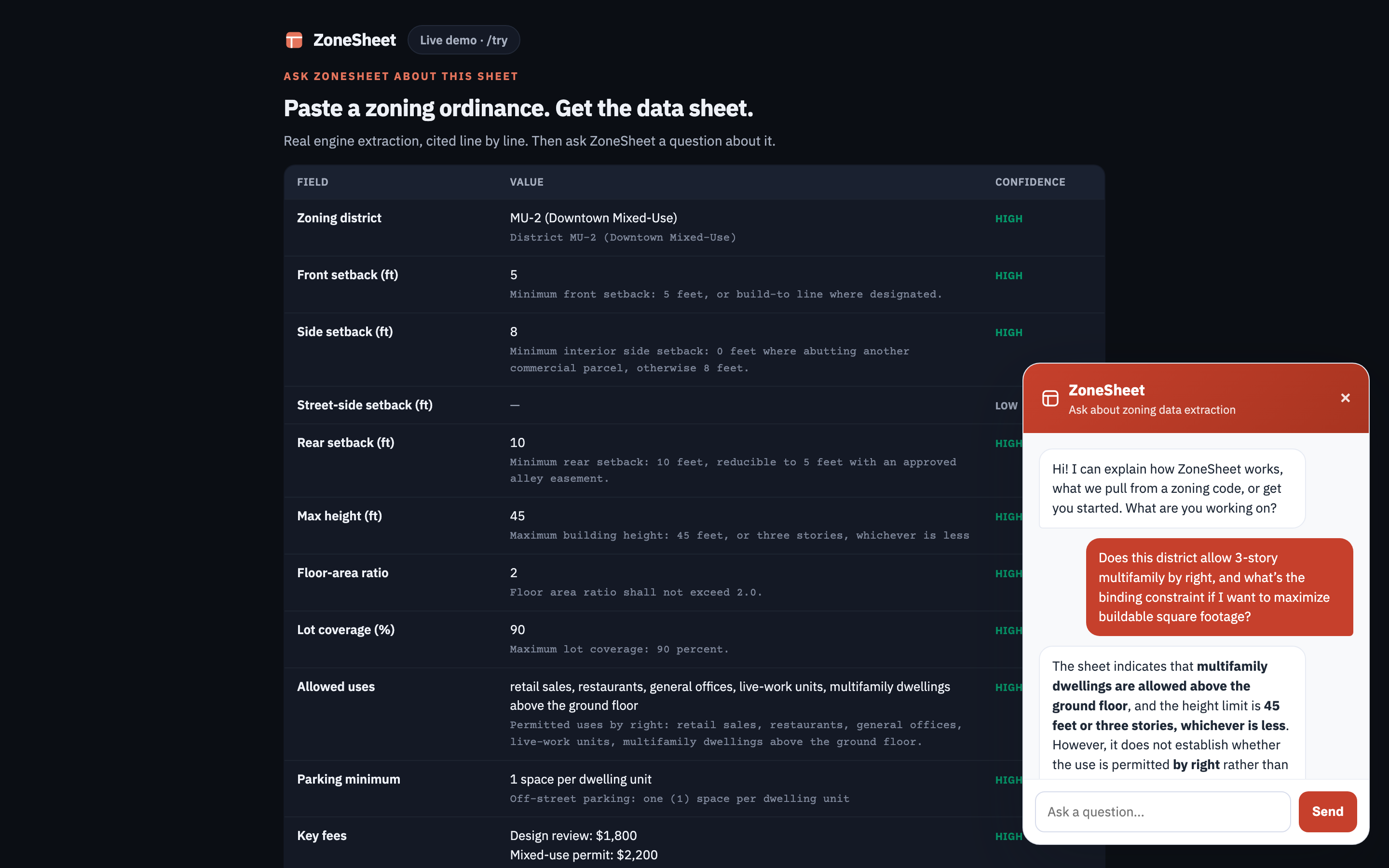
Sheet-level chat is live at /try. Join the list for chat across your whole library.
Fees and allowed uses
Fee schedules and permitted-use tables extracted alongside the dimensional standards.
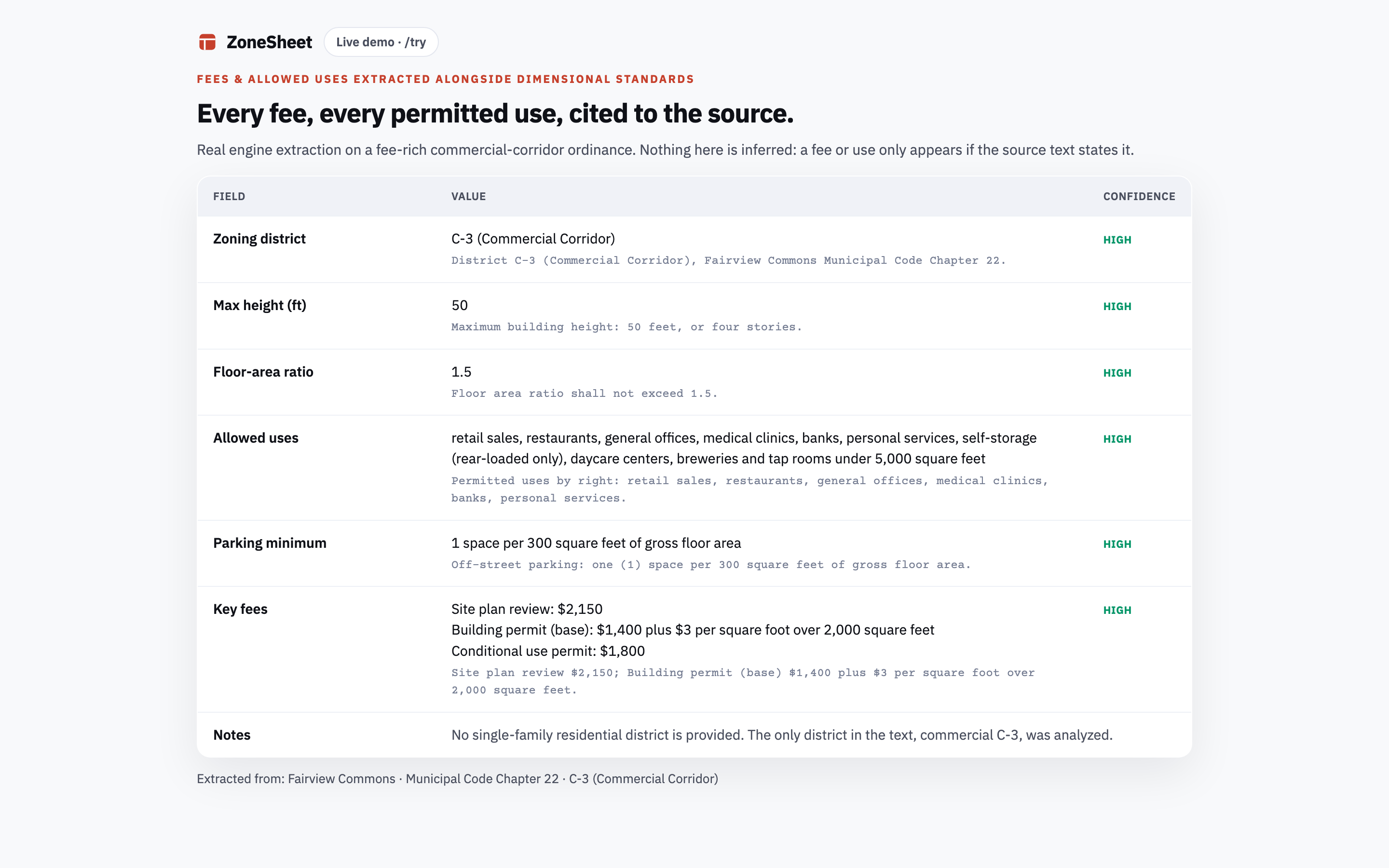
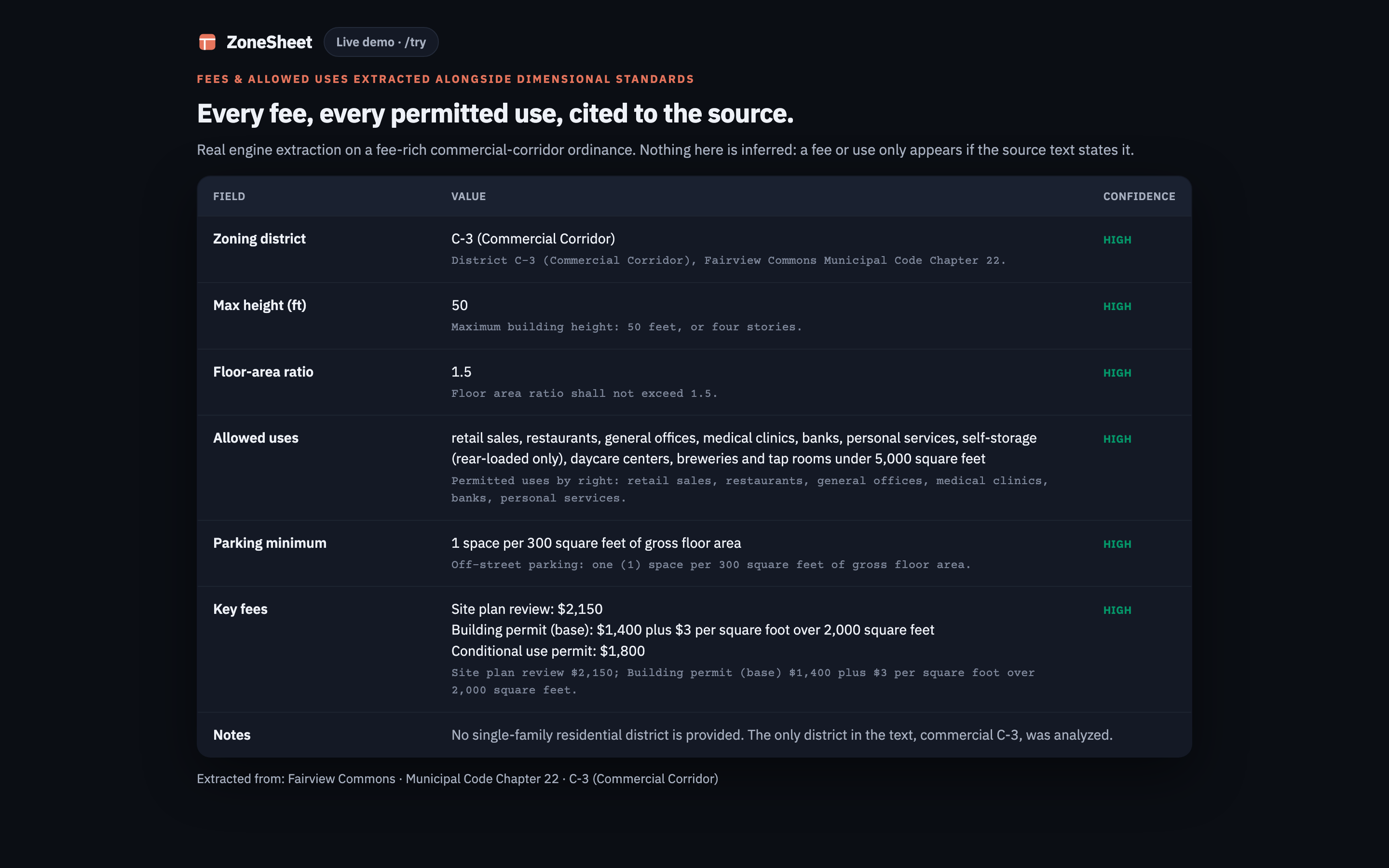
Live now. The screen above is a real extraction, not a mockup.
Exports
Comma-separated values ("CSV") and JavaScript Object Notation ("JSON") export from every run, on every tier, and Excel export on the paid plans. Join the list for a public API with webhooks, for zoning data landing straight in your own system.
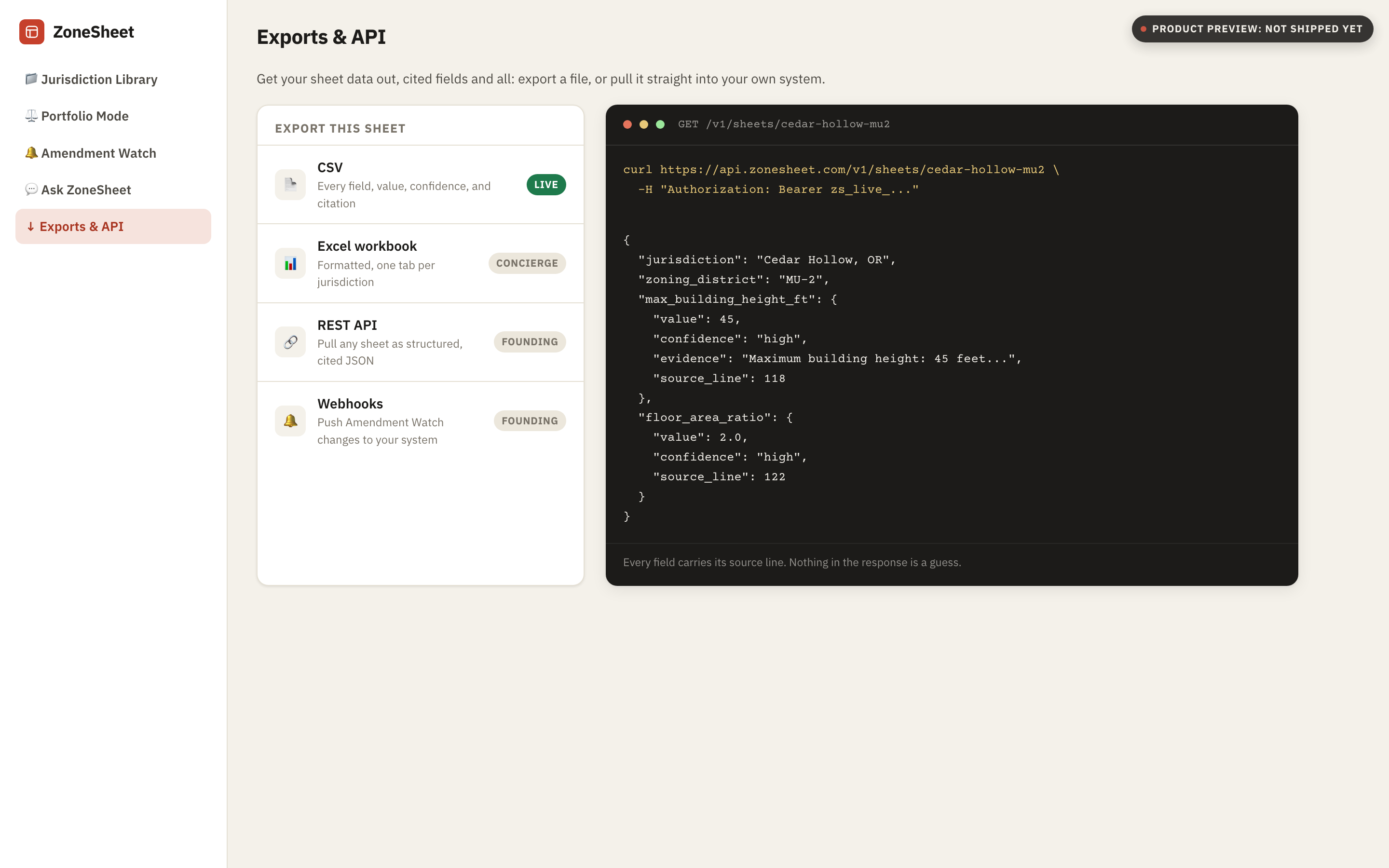
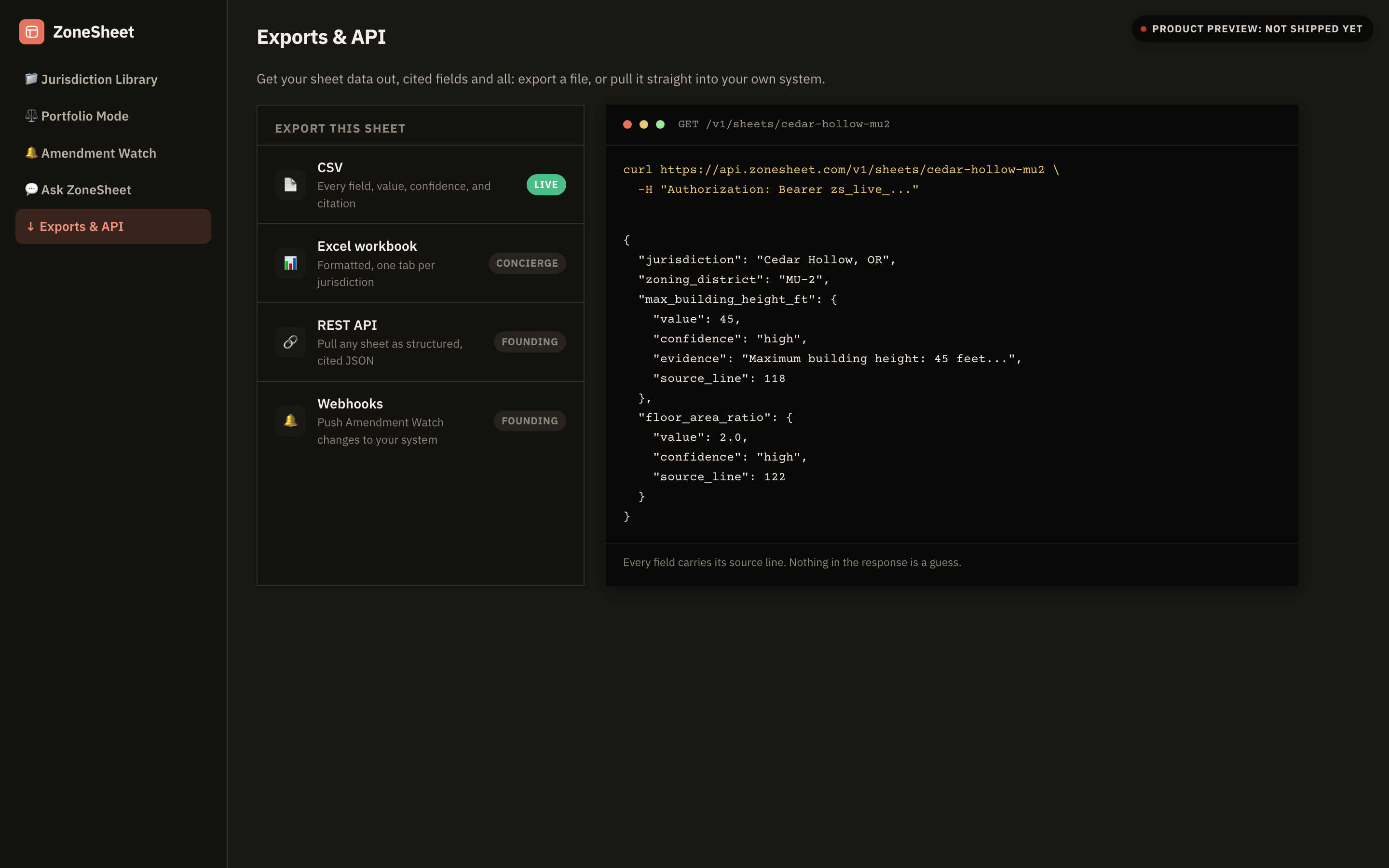
Live now.
Watch it work
This simulates what ZoneSheet does: scan a zoning ordinance and populate a structured datasheet, field by field, with source citations. Click any populated row to see where in the document the value came from.
Article XIV · R-1 Single-Family Residential District
§ 14-16-2-3. Dimensional Standards
(A) Setbacks. No structure shall be erected or altered within the R-1 District unless the following yard dimensions are observed: minimum front setback 25 ft from the front lot line; side setback 5 ft from each interior side lot line; and a minimum rear setback 20 ft from the rear lot line. Corner lots shall maintain the required front setback along both street frontages.
(B) Height. No principal structure shall exceed a max building height 35 ft as measured from average finished grade. Accessory structures are limited to 18 ft or the height of the principal structure, whichever is less.
(C) Intensity. The FAR 0.5 applies to all principal structures. Accessory dwelling unit square footage is excluded from FAR calculations when permitted as a conditional use. Maximum impervious surface shall not exceed a lot coverage 40% of the total lot area.
(D) Lot Size. The minimum lot area 7,500 sf is required for all new single-family lots created after the effective date of this ordinance.
§ 14-16-2-4. Use Regulations
The following uses are permitted within the R-1 District: single-family dwelling permitted by right in all sub-districts. Accessory dwelling unit conditional (subject to approval under § 14-22-5).
§ 14-30-1. Fees
Applications for residential building permits shall be accompanied by a non-refundable building permit fee $450 per unit for new construction under 2,500 sf of heated area, payable at time of submittal.
| Field | Value |
|---|---|
| Front setback |
—
"front setback 25 ft"
§ 14-16-2-3(A), p. 42
|
| Side setback |
—
"side setback 5 ft"
§ 14-16-2-3(A), p. 42
|
| Rear setback |
—
"rear setback 20 ft"
§ 14-16-2-3(A), p. 42
|
| Max building height |
—
"max building height 35 ft"
§ 14-16-2-3(B), p. 42
|
| floor-area ratio ("FAR") |
—
"FAR 0.5"
§ 14-16-2-3(C), p. 42
|
| Max lot coverage |
—
"lot coverage 40%"
§ 14-16-2-3(C), p. 42
|
| Minimum lot area |
—
"minimum lot area 7,500 sf"
§ 14-16-2-3(D), p. 42
|
| Single-family dwelling |
—
"single-family dwelling permitted by right"
§ 14-16-2-4, p. 42
|
| Accessory dwelling unit |
—
"Accessory dwelling unit conditional"
§ 14-16-2-4, p. 42
|
| Building permit fee |
—
"building permit fee $450"
§ 14-30-1, p. 42
|
Zoning codes are written to be
comprehensive, not usable.
A single municipal PDF can run 300+ pages. The five numbers you need for a feasibility check are buried on pages 74, 142, 198, and two appendices. Every project starts with the same manual hunt.
Hours of manual research every week
Active architects and permit coordinators spend eight to 20 hours a week reading zoning documents before they can run a basic massing study, which is 32 to 80 hours a month. At $85 an hour fully loaded, that is $2,720 to $6,800 of research overhead a month.
Hours: MeltPlan, 2025, which reports 8 to 20 hours a week on code research. The $85 fully loaded rate is our own assumption, not a sourced figure.
Codes change without notice
Municipalities update ordinances continuously. Yesterday's screenshot is today's liability. Each project requires a fresh read-through to confirm numbers haven't shifted.
Inconsistent formats across jurisdictions
Setbacks may be in a table, in running text, or in a diagram caption. Parking ratios might be in section four or in an overlay appendix. There is no standard.
Early mistakes are the most expensive
A missed height limit or incorrect floor-area ratio discovered during plan-check means redesigns, re-permit fees, and schedule compression. A rejected submittal costs $805 on average in direct costs (BuildSync, from a survey of more than 6,000 construction professionals). On a fully drawn $1.5M construction loan at 7%, a 6.5-month permit slip adds $56,875 in carrying cost alone. Getting it right at the start changes the economics of every project.
The extraction schema behind every capability above.
Every capability above runs on the same tagged field schema. It is built for AEC and permitting work instead of a generic PDF-to-text pass. These are the fields, labeled and ready to export.
Dimensional fields
Front, side, and rear setbacks, maximum height, floor-area ratio, and lot coverage, each with a page reference.
Use and overlay fields
Principal, conditional, and prohibited uses, each listed by right, plus any overlay or special-district note attached to the parcel.
Parking and fee fields
Parking ratios by use type, Americans with Disabilities Act ("ADA") requirements, in-lieu options, impact fees, and connection charges, tagged the same way on every PDF.
The database-backed tools in the table below need your municipality loaded before they can answer, and the gaps are where projects get hurt. ZoneSheet reads the structure and language of any zoning document you already have, covering all 38,736 US counties, municipalities, and townships wherever that document carries a text layer, including jurisdictions none of the five zoning tools in the table below covers today.
It reads the PDF you already have, and cites the page it read.
Five zoning tools, doing it yourself in ChatGPT, and ZoneSheet, with each row scored the same way against what every vendor publishes about itself.
| Feature | ZoneSheet | Zoneomics | Gridics | UpCodes | My Zoning AI | ChatGPT, done yourself | Plotzy |
|---|
Scores are based on publicly available product information as of mid-2026; verify with each vendor before purchasing.
Small builders keep proving the same four things.
Independent developers and researchers have been chipping away at this exact problem for years, one city or one feature at a time. The projects we studied each proved one piece and stopped there. ZoneSheet was built to be the tool that puts it all together.
Show your work, every time
The tools we studied in this space, from a university research project to a two-person startup, each point back to the exact page. An answer nobody can verify is worse than no answer at all when it is going into a permit submission. ZoneSheet cites the source row on every extracted value for exactly this reason.
The messy, scanned, decades-old PDF is the real test
The zoning ordinances that cause the most pain are rarely the clean, modern ones. They are the scanned, skewed, decades-old municipal PDFs that defeat a plain PDF-to-text pass. That is exactly the gap ZoneSheet is closing next: reliable reading on the messy documents as well as the easy ones.
Your jurisdiction, whatever its size
The complaint that recurs about database-backed zoning tools is that the city or county in front of you is not in the database. ZoneSheet works the other way: if you have the ordinance as a text-layer PDF, your jurisdiction is covered today.
Priced for how firms actually use it
A recurring frustration with the bigger platforms: paying again when the tool's own extraction fails, or a subscription that doesn't match how often a small firm actually pulls permits. ZoneSheet's flat monthly price covers your self-serve runs, so a firm pulling three permits a month and one pulling 30 pay the same predictable price. Self-serve runs at /try come back immediately: five of them free with no card, and unmetered once you are on a paid plan. Pro also includes up to 15 PDFs a month run for you by a person, back within one business day.
Three steps, about 30 seconds.
No training, no configuration, no prompting. Upload the PDF, get the sheet.
Upload your PDF
Drop in a zoning ordinance, a use table, or a fee schedule. Searchable PDFs and multi-section downloads work today.
Cross-references resolved automatically
ZoneSheet locates, reads, and normalizes the dimensional fields, resolving cross-references between sections automatically, and flags its own confidence per field rather than presenting every value as certain, with no templates to configure and no prompts to write.
Export and use
Download a clean comma-separated values ("CSV") or JavaScript Object Notation ("JSON") file with all fields labeled, units noted, and the verbatim source line cited for every value. Drop it into Excel, Google Sheets, or your project database.
| field | value | unit | page_ref | confidence |
|---|---|---|---|---|
| zone_designation | R-2 Medium Density Residential | — | §18.12.010· §18.12.010 | ✓ high |
| setback_front_ft | 20 | ft | §18.12.040(A)· §18.12.040(A) | ✓ high |
| setback_side_ft | 5 | ft | §18.12.040(B)· §18.12.040(B) | ✓ high |
| setback_rear_ft | 15 | ft | §18.12.040(C)· §18.12.040(C) | ✓ high |
| height_max_ft | 35 | ft | §18.12.060· §18.12.060 | ✓ high |
| far_max | 0.65 | ratio | §18.12.070· §18.12.070 | ✓ high |
| lot_coverage_max_pct | 45 | % | §18.12.070· §18.12.070 | ✓ high |
| parking_ratio_residential | 2.0 per unit | spaces/unit | §18.40.020· §18.40.020 | ✓ high |
| impact_fee_per_unit | $14,200 | USD | Fee Schedule p.7· Fee Schedule p.7 | ~ verify |

One afternoon of research costs more than a month of ZoneSheet.
Start today. Your price is locked for as long as your subscription stays active.
Run five documents at no cost, with no card, and judge the output yourself. The seven-day trial below is the separate, full-access trial of Pro.
- Five PDF extractions
- Comma-separated values ("CSV") and JavaScript Object Notation ("JSON") export
- All 14+ data fields
For solo practitioners and small project teams who run feasibility checks regularly.
- Self-serve extractions at /try, about 30 seconds each
- CSV, JSON, and Excel export
- 90-day history with search
- Bulk upload (up to 20 PDFs)
- Email support
$39/mo (list price $79/mo). Run documents yourself at /try in about 30 seconds, and send up to 15 PDFs a month for a person to run within one business day. Seven-day free trial.
Start your free trial: $39/mo →For firms that want up to 10 seats, dedicated onboarding, and priority support.
- Everything in Pro
- Up to 10 seats
- Dedicated onboarding call
- Priority support
A permit coordinator running two extractions per week spends $638–$1,275/month in labor on this task (at $85/hr fully loaded).
ZoneSheet Pro is $39/month (list price $79/month). That is less than one hour of the labor above.
At $85 an hour, $39 is covered by the first 28 minutes of reading you avoid.
Pro is $39 per month (list price $79 per month). Pro and Team include a seven-day free trial. The free tier runs five documents with no card. Cancel anytime.
Common questions
Why not paste the PDF into ChatGPT?
You can, and for a single quick read it can help. Where it falls short for repeat work: it carries no schema for zoning fields, so setbacks, floor-area ratio, lot coverage, and fees come back as prose you restructure yourself rather than a datasheet you can drop into a bid package, and whether each value arrives with a page-and-line citation depends on how you prompt it that day. ZoneSheet does both by default, in the same shape on every document, which is the part a general chat tool leaves to you.
What kinds of PDFs does ZoneSheet handle?
Any municipal zoning ordinance, land-use table, design standards document, or permit fee schedule that carries a text layer, including multi-section composite documents.
How accurate is the extraction?
Each field includes a confidence flag and a page-number citation so you can spot-verify. Measured on 2026-06-16: 24 of 25 fields correct on clean sample PDFs, and all five of the dimensional fields that ordinance sets (front, side, street-side, and rear setbacks, and maximum height) extracted and cited on a full 672-page Albuquerque ordinance after a section-targeting fix, with zero hallucinated values across every test. The accuracy page shows the misses too. Lower-confidence flags prompt a human check, and the page reference is cited so you can go straight to the source.
Does it work for every municipality in the US?
ZoneSheet is jurisdiction-agnostic by design: it reads the structure and language of the document you give it rather than a hard-coded database of ordinances, so nothing has to be indexed first and every one of the 30,000-plus US counties, municipalities, and townships is in scope wherever its ordinance is a text-layer PDF. Being in scope is not the same as being measured: the published accuracy runs are 25 fields across clean sample PDFs and one full 672-page ordinance, and the accuracy page shows the misses as well as the hits.
What happens to my uploaded documents?
Documents are processed securely and are not retained beyond your session unless you are on a paid plan with history enabled. We do not train models on your uploads and do not share document contents with third parties. See our Privacy Policy for full details.
Can I cancel or change plans anytime?
Yes. There are no contracts. You can upgrade, downgrade, or cancel from your account settings at any time. Full refund terms are in our Terms of Service.
Does the Team plan support more than 10 seats?
Yes, larger firms can contact us for enterprise pricing. We set up custom seat counts and single sign-on ("SSO") by hand for each firm. Join the list for volume-priced API access.
Ask it anything the FAQ did not cover
Prices come from our own price table, coverage comes from the fee database, and it will tell you when something is outside what this site publishes rather than guessing.

Turn your next 90-minute code read into a 30-second datasheet.
Put your next zoning PDF through ZoneSheet and see the datasheet in 30 seconds.
No promotional email, no credit card, and you can unsubscribe anytime.